
Downloads
MANUALS
SOFTWARE
FIRMWARE
MANUALS
YourDyno Standard v4/v5 hardware installation instructions
YourDyno Eddy current power supply manual
Stainless Steel Water brake valve manual
(new with zero position sensor)
Water brake valve manual
(previous version)
CANBus plugin manual
SOFTWARE
UnaVision software v4.0.67
(Apr 8rd 2026)
This is the latest UnaVision software.
YourDyno software v3.3.104
This is the old YourDyno software for those who prefer the old version.
To see the software change log and comments go to the following forum post
FIRMWARE
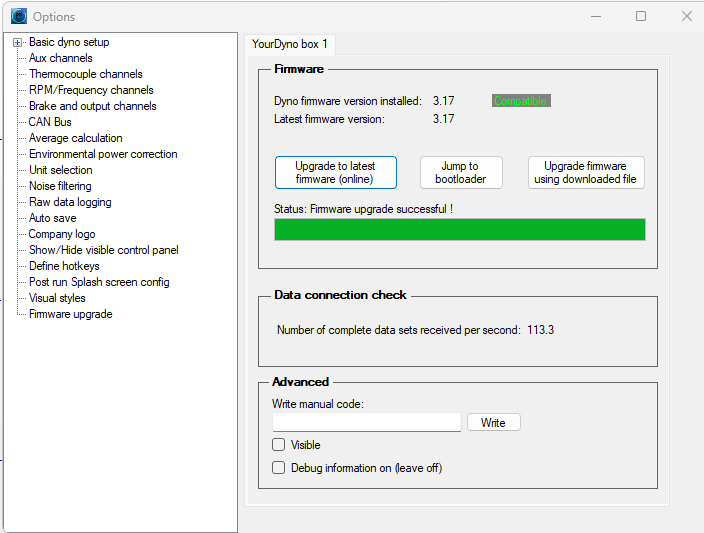
Firmware is the software running inside the YourDyno box. The firmware can be upgraded automatically from within the software by the press of a button. Firmware is automatically updated if you press the “Upgrade to latest firmware” button in Options > Firmware upgrade. If you upgrade offline then you need to download the firmware file. Use the option “Upgrade firmware using downloaded file”. There is no harm trying the wrong file, you will just get an error message. For new YourDyno deliveries, all is set up already from the factory, you can just press the button in the software to upgrade the system when new firmware is available. For YourDyno hardware version 1 you need to enable this by upgrading the bootloader (only once). You can upgrade the bootloader by downloading this file and the downloader program below: YourDyno v1 Firmware bootloader Please download firmware files below.
Utilities:
Firmware downloader program (only necessary for very early versions of YourDyno, YourDyno version 1).
YourDyno Standard v4
YourDyno Standard v4
(another file)