
Q&A Forum
I managed to recreate the print problem by enabling the Administrator user and logging in as that user. Don't do that. Run as a normal user. Let us know if that fixes the problem.
Interestingly, I also got the "YourDyno not responding correctly" error as Administrator, but it was solved by disconnecting and connecting again.
Please try http://yourdyno.com/YourDynoInstaller_3.2.34.msi and let me know if print issue is resolved or not.
Correct, bmgjet. I meant was exactly that, you run as a normal user, but the user should have administrative rights on the PC. And the message you see that you need to allow YourDyno to make changes to the computer should really only come when you install YourDyno, not every time you start it. So I still think something is wrong with the environment (does anyone else see this message when starting YourDyno?).
I am looking at the print issue. This is not easy to debug, as I cannot replicate it. From browsing the web I know the problem may be that when YourDyno asks Windows for the default printer it returns "null", which means no default printer is set for the current user. Windows should always set the default printer to one of the printers installed, so this "should not be possible" unless no printer is installed or the user do not have access, but several people are reporting this exact problem with other applications.
I will add some extra checks in the code and force the selection of the default printer if none is set, let's see if that solves it. New version coming soon.
Well that would get you going until the issue with your setup has been identified.
In a production envoriment where you depend on a computer for your income you should really be keeping a weekly OS clone backup on a external source.
You shouldnt have to run as admin. Im not on any of my computers that are running yourdyno. (3 computers)
In IMO running as a normal user is better so then if you save .cvs files to USB stick they wont have permission issue when trying to open them on another computer with low user privileges.
Could you try this, run YourDyno as your normal user account, Then make sure "your users account" or "Everyone" has permission to print and manage the printer.
To get to security page for the printer.
Go to Printer & Scanners
Select your printer from the list.
Click manage
Click printer properties.
Click Security.
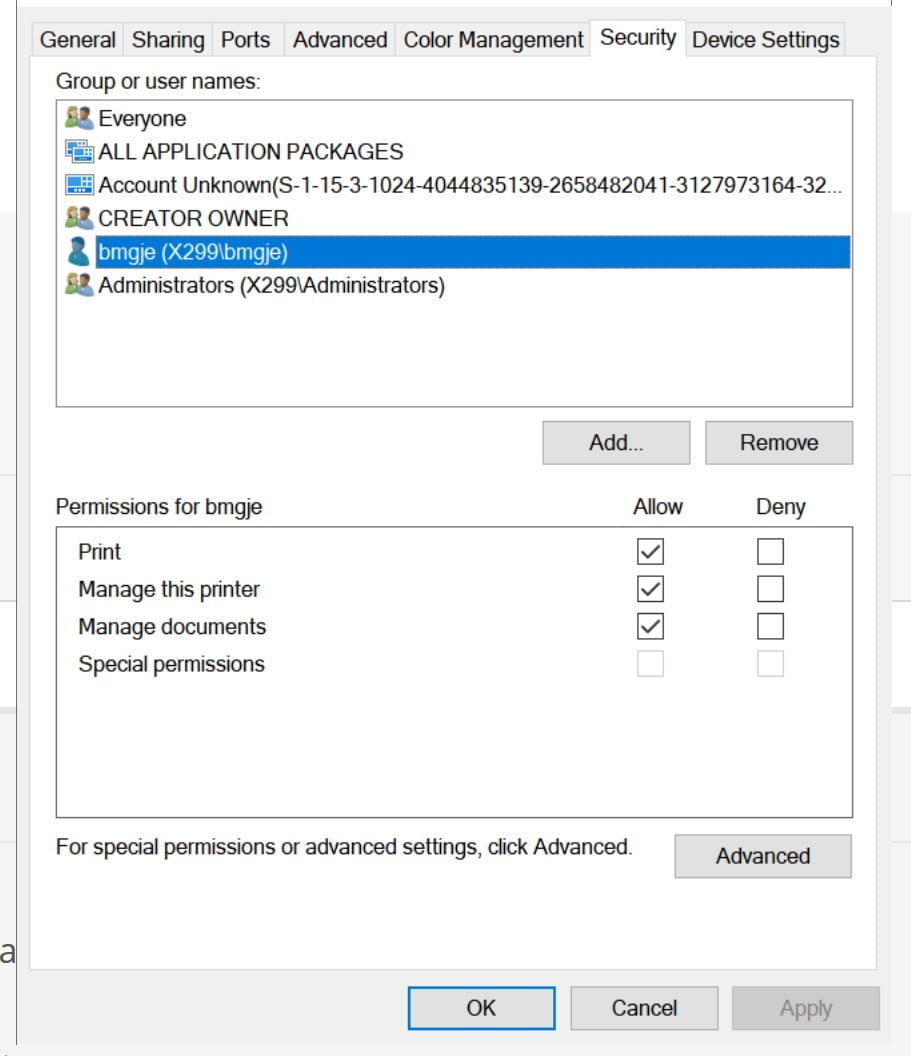
Just make a screenshot, export to paint, save as png or bmp. That’s what i do anyway as i like the layout better then the print version.
Lol
Just make a screenshot, export to paint, save as png or bmp. That’s what i do anyway as i like the layout better then the print version.
Hi,
I browsed the web on the printer error, and a number of people have reported it (unrelated to YourDyno). The best advice was:
- Make sure there is a default printer configured
- Make sure the identity under which the application is running has permission to access the printer
From the video, I am puzzled that you need to click Yes to accept the application making changes to the system when you are starting up YourDyno. This is not normal. Does your user have administrative rights? If not, can you try that?
Are you able to print to PDF?
1. as said before, i have some printers, such as pdf, and the canon which is the one i use wirelessly.
2. software is run under administrator rights, so it has access to everything, and that's why i receive thar warning in the begining when opening. computer has been formated 5 times since the update. Only thins installed are drivers, yourdyno and printer. I also downloaded .net 4.8 just in case and after having the problems.
no i am not able to print to pdf either. out of yourdyno i can print from note pad, testpage… everything works fine.
New software is all good at my end, printed out may plots already.
Hi,
I browsed the web on the printer error, and a number of people have reported it (unrelated to YourDyno). The best advice was:
- Make sure there is a default printer configured
- Make sure the identity under which the application is running has permission to access the printer
From the video, I am puzzled that you need to click Yes to accept the application making changes to the system when you are starting up YourDyno. This is not normal. Does your user have administrative rights? If not, can you try that?
Are you able to print to PDF?
I already installed lateSt even with timeout problem, I have the printer problem the same
And which version are you running. As said, use 3.01.83 if you dont use the latest.
See the end of this message for details on invoking
just-in-time (JIT) debugging instead of this dialog box.
*********** Exception Text ********
System.Drawing.Printing.InvalidPrinterException: No printers are installed.
at System.Drawing.Printing.PrinterSettings.GetHdevmodeInternal(String printer)
at System.Drawing.Printing.PrinterSettings.GetHdevmodeInternal()
at System.Drawing.Printing.PrinterSettings.CreateInformationContext(PageSettings pageSettings)
at System.Drawing.Printing.PageSettings.get_PrintableArea()
at YourDyno.PrintSetup.q9y6SV2T4hI6Ocxeh7L(Object )
at YourDyno.PrintSetup.c5ItufXWx8()
at YourDyno.PrintSetup.yKUta9lrqt(Object , EventArgs )
at System.Windows.Forms.CheckBox.OnCheckedChanged(EventArgs e)
at System.Windows.Forms.CheckBox.set_CheckState(CheckState value)
at System.Windows.Forms.CheckBox.OnClick(EventArgs e)
at System.Windows.Forms.CheckBox.OnMouseUp(MouseEventArgs mevent)
at System.Windows.Forms.Control.WmMouseUp(Message& m, MouseButtons button, Int32 clicks)
at System.Windows.Forms.Control.WndProc(Message& m)
at System.Windows.Forms.ButtonBase.WndProc(Message& m)
at System.Windows.Forms.Control.ControlNativeWindow.OnMessage(Message& m)
at System.Windows.Forms.Control.ControlNativeWindow.WndProc(Message& m)
at System.Windows.Forms.NativeWindow.Callback(IntPtr hWnd, Int32 msg, IntPtr wparam, IntPtr lparam)
******** Loaded Assemblies ********
mscorlib
Assembly Version: 4.0.0.0
Win32 Version: 4.8.3761.0 built by: NET48REL1
CodeBase: file:///C:/Windows/Microsoft.NET/Framework/v4.0.30319/mscorlib.dll
----------------------------------------
YourDyno
Assembly Version: 3.2.10.0
Win32 Version: 3.2.10.0
CodeBase: file:///C:/Program%20Files%20(x86)/YourDyno/YourDyno.exe
----------------------------------------
System
Assembly Version: 4.0.0.0
Win32 Version: 4.8.3761.0 built by: NET48REL1
CodeBase: file:///C:/Windows/Microsoft.Net/assembly/GAC_MSIL/System/v4.0_4.0.0.0__b77a5c561934e089/System.dll
----------------------------------------
System.Windows.Forms
Assembly Version: 4.0.0.0
Win32 Version: 4.8.3761.0 built by: NET48REL1
CodeBase: file:///C:/Windows/Microsoft.Net/assembly/GAC_MSIL/System.Windows.Forms/v4.0_4.0.0.0__b77a5c561934e089/System.Windows.Forms.dll
----------------------------------------
System.Drawing
Assembly Version: 4.0.0.0
Win32 Version: 4.8.3761.0 built by: NET48REL1
CodeBase: file:///C:/Windows/Microsoft.Net/assembly/GAC_MSIL/System.Drawing/v4.0_4.0.0.0__b03f5f7f11d50a3a/System.Drawing.dll
----------------------------------------
DynoDataConnection
Assembly Version: 1.0.0.4
Win32 Version: 1.0.0.4
CodeBase: file:///C:/Program%20Files%20(x86)/YourDyno/DynoDataConnection.DLL
----------------------------------------
PluginContracts
Assembly Version: 1.0.0.4
Win32 Version: 1.0.0.4
CodeBase: file:///C:/Program%20Files%20(x86)/YourDyno/PluginContracts.DLL
----------------------------------------
System.Core
Assembly Version: 4.0.0.0
Win32 Version: 4.8.3761.0 built by: NET48REL1
CodeBase: file:///C:/Windows/Microsoft.Net/assembly/GAC_MSIL/System.Core/v4.0_4.0.0.0__b77a5c561934e089/System.Core.dll
----------------------------------------
System.Management
Assembly Version: 4.0.0.0
Win32 Version: 4.8.3761.0 built by: NET48REL1
CodeBase: file:///C:/Windows/Microsoft.Net/assembly/GAC_MSIL/System.Management/v4.0_4.0.0.0__b03f5f7f11d50a3a/System.Management.dll
----------------------------------------
Settings
Assembly Version: 1.0.0.4
Win32 Version: 1.0.0.4
CodeBase: file:///C:/Program%20Files%20(x86)/YourDyno/Settings.DLL
----------------------------------------
System.Configuration
Assembly Version: 4.0.0.0
Win32 Version: 4.8.3761.0 built by: NET48REL1
CodeBase: file:///C:/Windows/Microsoft.Net/assembly/GAC_MSIL/System.Configuration/v4.0_4.0.0.0__b03f5f7f11d50a3a/System.Configuration.dll
----------------------------------------
System.Xml
Assembly Version: 4.0.0.0
Win32 Version: 4.8.3761.0 built by: NET48REL1
CodeBase: file:///C:/Windows/Microsoft.Net/assembly/GAC_MSIL/System.Xml/v4.0_4.0.0.0__b77a5c561934e089/System.Xml.dll
----------------------------------------
ZedGraph
Assembly Version: 6.0.0.37542
Win32 Version: 6.0.0.37542
CodeBase: file:///C:/Program%20Files%20(x86)/YourDyno/ZedGraph.DLL
----------------------------------------
Accessibility
Assembly Version: 4.0.0.0
Win32 Version: 4.8.3761.0 built by: NET48REL1
CodeBase: file:///C:/Windows/Microsoft.Net/assembly/GAC_MSIL/Accessibility/v4.0_4.0.0.0__b03f5f7f11d50a3a/Accessibility.dll
----------------------------------------
CyUSB
Assembly Version: 3.4.7.0
Win32 Version: 3.4.7.0
CodeBase: file:///C:/Program%20Files%20(x86)/YourDyno/CyUSB.DLL
----------------------------------------
System.ComponentModel.Composition
Assembly Version: 4.0.0.0
Win32 Version: 4.8.3761.0
CodeBase: file:///C:/Windows/Microsoft.Net/assembly/GAC_MSIL/System.ComponentModel.Composition/v4.0_4.0.0.0__b77a5c561934e089/System.ComponentModel.Composition.dll
----------------------------------------
******** JIT Debugging ***********
To enable just-in-time (JIT) debugging, the .config file for this
application or computer (machine.config) must have the
jitDebugging value set in the system.windows.forms section.
The application must also be compiled with debugging
enabled.
For example:
<configuration>
<system.windows.forms jitDebugging="true" />
</configuration>
When JIT debugging is enabled, any unhandled exception
will be sent to the JIT debugger registered on the computer
rather than be handled by this dialog box.
The error message includes the clues to what is wrong 😂, so I need the whole message. The full text. Just copy-paste it.
You need to click on the Details button.